
2.8 ILI9341 restive touch miso not connected ?

Status
Not open for further replies.
Perhaps the TouchPaint sample came from a different default rotation? The PJRC LIB follows the device DOC labelling of x,y. That sketch works with:
tft.setRotation(1);

That isn't the best use of the screen - but that rotation aligns with the x,y as they are returned by the device.

I just put the above TS_GetMap into the sketch and when started at TS_Rotate=2 it runs well. The "#define TS_DEBOUNCE 3" causes dot skipping as it ignores adjacent dots and should be set to 1 perhaps for this app.

Here is my version: View attachment TouchPaint_nov03a.ino <edited>

In case this makes it to a SAMPLE I fixed the setup() wait for serial. I also changed the debounce to 1. It does get spurious hits - something you don't see when not painting each hit. One thing might be to add a Z threshold in the GetMap - another might be to slow down the polling rate with a 30ms delay between calls.
 
Last edited:
Here are the edits I made to the TouchPaint TS_GetMap to slow the poll rate (for a solid line you draw more slowly and can get a straighter line), also put in rejection of low points without MinPressure. When I get back to my BUTTON generalization - this could make a good sample - and allow more buttons for CLEAR etc.

Code:
#define TS_LIMIT 10 // millisecond limit to check touch value
#define TS_MINPRESS 800 // Z Pressure return minimum to use point
elapsedMillis tsLimit;
#define TS_DEBOUNCE 2 // TX_Map() debounce factor
boolean TS_GetMap( int16_t &xx, int16_t &yy )
{
  static int16_t xxo = 500, yyo = 500;  // Store old/last returned x,y point
  if ( tsLimit< TS_LIMIT ) return false;
  if (!ts.touched()) return false;
  tsLimit = 0;
  pp = ts.getPoint();
  if ( pp.z < TS_MINPRESS ) return false;
  xx = map(pp.x, TS_MINX, TS_MAXX, tsMap[TS_Rotate].xt, tsMap[TS_Rotate].xb);
  yy = map(pp.y, TS_MINY, TS_MAXY, tsMap[TS_Rotate].yl, tsMap[TS_Rotate].yr);
  if (TS_Rotate % 2) {
    int16_t swap = xx;
    xx = yy;
    yy = swap;
  }
  // Debounce by +/-# pixel to minimize point jitter
  if ( ((xxo - TS_DEBOUNCE) <= xx) && ((xxo + TS_DEBOUNCE) >= xx) ) xx = xxo; else xxo = xx;
  if ( ((yyo - TS_DEBOUNCE) <= yy) && ((yyo + TS_DEBOUNCE) >= yy) ) yy = yyo; else yyo = yy;
  return true;
}
 
Last edited:
Perhaps the TouchPaint sample came from a different default rotation?
The sektch from the Adafruit lib is using a different axis-mapping, i think the touchpanel of their display is different (and isn't it capacitive?)
Paul uses a different mapping so they are not compatible. So you can't use the Touchpaint-example from the examples-menu for "our" display without changing it.

edit:... changing it means to make it incompatible to previous versions so users will run into problems.
 
@frank - my stuff not yet on githib - I did have that thought a post or two ago when I had to re-upload to forum - but not finding the time to complete my first pass so it shows what I want. Though the GetMap() turned out to be quickly useful for the update above! You could port that to T3TRIS and invert your screen for two players taking turns head to head!

Perhaps this fork of TouchPaint will evolve to its own unique example specific to XPT2046_Touchscreen.
 
GitHub has something from me on the TouchPaint Example

Somehow I created a branch so it is under Beta3. This is in my fork of the PJRC code so my working XPT2046_Touchscreen LIB code is there too. Hoping that makes it into the next Beta of 1.26, but Arduino 1.6.6 dropped today and not sure where it will fall out if Paul finds it a worthy update.

I modified the TouchPaint to use Button Definitions from an Array of Structs and moved the action code to functions that loop through the array to do the work. Not a general purpose solution, but drops lines of code and uncluttered the loop for sure of repeated drawRect and fillRect. You can initialize it to start on any tft.setRotation() though 2 or 4 makes sense with how the buttons are laid out.
 
Updated onoffbutton example updated on Github.

Added 5 more frames that fit through all rotations - put buttons in one of them. State and control all handled through Button Struct.

X and Y are natural as expected - it is the TouchPaint that has the values confused as they use them - I ported them to a struct unchanged and they work through rotation - but backwards - very confusing. Maybe bboyes did the corrections on that.

Bad color choice on CYAN/YELLOW buttons - need to get rid of hardcoded white text color, need another struct element.

<edit> Updated: Third toggle active and cleaned up frame draw mistake
 
Last edited:
Teensytower

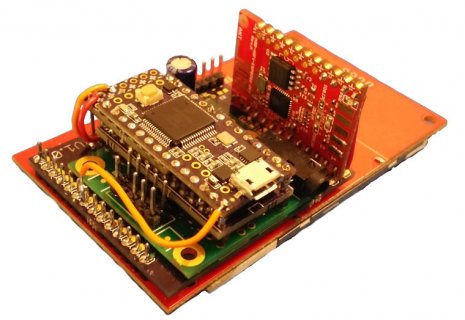
My "Teensytower" :)

teensytower.jpg
From top to bottom:
- Teensy 3.2 (OSHPARK edition)
- My "Connectorboard"
- My "Memoryboard" (1x16MB Flash, 5x128KB RAM)
- Audioshield
- My "DisplayBoard" (not published yet)
- ILI9341 2.8'' Display

On the side:
- OLIMEX ESP8266, power from Teensy 3.2

Not visible:
Pinheaders for
- Volume pot
- I2C
- IR-Reciever

The yellow patch-cable should not be there.. i planned to drive the backlight of the display with PWM, but made something wrong :)

Still some free pins.
 
Last edited:
Cool. Looking forward to seeing the DisplayBoard shared.

Does OSH has any way to search? Even if you save/order a board as a project it isn't easy to track back to the source - let alone find one without a direct link.
 
Cool. Looking forward to seeing the DisplayBoard shared.

Does OSH has any way to search? Even if you save/order a board as a project it isn't easy to track back to the source - let alone find one without a direct link.

Hm, this will take some time, if ever.... It has little problems, like PWM (Display-Backlight) not working and if used together with Audioshield+"Connectorboard" the pins are blocking the sd-card-slot so it is not easy to replace the sd-card ...
The connection for ESP8266 is useful with the OLIMEX-Board only (but that is not expensive)

But.. it works great!

807daaca676ec9e6b0f0b53c185be82c.png
Are there more poeple who would be interested ? If yes, i could do a new version...
 
Last edited:
Picture a good start to see what it was - as you know I'm looking at another ESP8266 unit - I just need to finish where I am and learn Eagle and put on it what I need. I just need to glue the power rx/tx to a raw ESP-12 layout. No audio needed and the video is a debug option - the PJRC touch OSH board would be a good start - though smaller power with SPX3819 or similar. I got the starter eagle I probably need from Constantine, but distracted by the TOUCH just now.
 
I don't use a power-regulator, i connect the display to 5V from USB and power the ESP8266 from the Teensy 3.2 (3.1 will not work)
With 5V, the backlight is very bright (no extra R on the LED pin). I ran it for long hours now with no damage - there is a resistor on board (can't speak for PJRC-Display, but i would think that they are the same)

EDIT:
...and...i would connect RTS/CTS, and the pins for flashing, too. Does the ESP12 have these connections ?
 
Last edited:
T_3.2 or T_3.1 gives a power choice - if 250ma is a safe average max the T_3.2 is here now. I started assuming the T_3.1 and outside LDO needed - haven't seen my ESP board yet so not sure how high it will peak.
PJRC drawings show 100 ohm external so I put those in and still usably bright in room light. Amazing how much light is BACK there from the underlying LEDs.
 
The toggle effectively seems that way if you touch color half and slide to text half - and I do require two hits - so logic exists that it would only count if you connect those two dots.

Changes in fours lines looks like about enough to do it to turn TOGGLE into SLIDE - but to add TOGGLE .vs. SLIDE would take a bit more. Not quite working - may need to edit a 5th line?
 
I suppose it should work to connect any two SLIDE buttons within a FRAME and the same sub_id.

For the sub_id I overloaded one struct element - that needs to come out to its own byte to eliminate all the bit test&preserve

And it would take a new ID toggle versus slide versus frame_button

<edit> for this to be usable it will take a tool like ' Resource Editor' this to construct the needed struct data: Stand-alone-Audio-Design-Tool
 
Last edited:
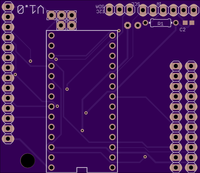
I purchase the purple board from OSH.

Can someone verify this is correct?

the two resistors inside the Teensy pads are to be 10K.
the resistor above pins gnd and Vin is 100 ohm.

I want to apply 5 volts to the 2.1mm power connector.

I do the following:
short the diode (removing reverse polarity safety for now)
short the fuse to the display (I don't have one)
short the two outside pads (input and output) of the 7805 (not installed).

This provides +5 volts to both the Teensy and to the Vcc of the Display connector.
 
Yes Richard that is right.

I'm just running from USB powered Teensy: I did not have the power supply so I just ran one wire from the VCC CAP pin hole over to the 3.3v Pin and did not need all the edits you did to bypass the power.

Did a print on a slide event on two toggle elements in a frame. Needs an update to add SLIDE class button for official support. Also this indicates slide and I need to find the spot to reset and I made it persist too well across the debounce requirement of two hits on a button to count.

GitHub updated: examples/onoffbutton/onoffbutton.ino

DIFFS: Showing 1 changed file with 10 additions and 0 deletions.
 
Last edited:
Paul: On your ToDo list please remember the OSH Display board update for the new version - just after Christmas when the T3++ ships :)

Paul - also this is a pretty cool post #123 is a cool TOUCH demo of windowing buttons if you want to take a 5 minute break to see what you've allowed us to create. Also BTW - if you have an extra minute I have that pull request on the : https://github.com/PaulStoffregen/XPT2046_Touchscreen/pull/1. I have not reverted to your B1 code to say it saves the world - but it is working for Frank and I.

@RichardF - have you tried my updated XPT2046_Touchscreen.cpp ?
 
Status
Not open for further replies.
Back
Top