
MIDI Disconnects unless connected to powered hub

Thundercat

Well-known member
Hi all,

I've encountered a strange thing with both a Teensy 4.0 and a Teensy 4.1. I've got a MIDI fader with a Teensy 4.0/4.1 that works fine when I connect the unit to a powered hub, but when I have the unit connected directly to a 2013 MacBook Pro, it cuts out MIDI connection at random.

While I'm grateful to have a workaround by using a powered hub, I'm worried why it would not work when directly connected to the computer. This is in a product I sell, so I'm quite anxious about this tbh.

It works rock solid with the USB hub, and abysmally when connected directly to the MacBook Pro USB port. I've tried swapping cables, but this didn't change anything.

Any ideas on this?

Thanks,

Mike
 
could be that it is drawing too much current, if it's over 500mA the MBP will cut power to it.
if you have a multi meter can you measure the current? or can you put up an schematic of the circuit you are using (how many sliders, what value, anything else in the box etc)

cheers Paul
 
Thank you Paul.

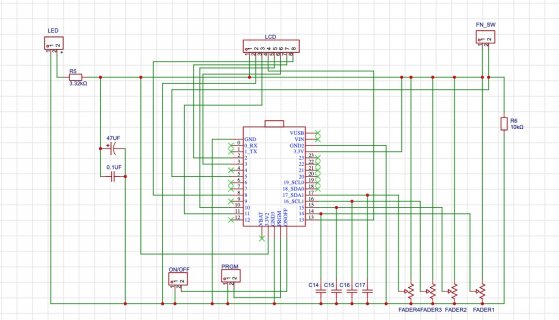
4 faders, a small LCD screen, and a power LED.

I tried using the other USB port on my MacBook Pro, and noticed it cut out once only, and then seemed to be fine. So now I start to wonder if this is a problem with the MacBook Pro itself and not the code or the Teensy needing too much power.

Attached is the schematic.

Thanks for any insights.

Mike

Screen Shot 2023-06-15 at 12.53.49 PM.jpg
 
Hey Mark, that's very insightful! Thank you very much.

I'll make the switch for future PCBs and we'll see if that eliminates that issue.

Great spotting!

I wonder why only 1 USB port acts funny though; if I use the USB port on the opposite side of the MacBook, it works fine.

Thanks again!

Mike
 
By the way, now that I think about it, the USB spec allows up to 10uF doesn't it? I want some stability added...

Thanks again,

Mike
 
Teensy 4.0 already has 2.2uF directly connect to VBUS, and two 0.22uF connected just after the PTC fuse, ferrite bead inductor and mosfet transistor. Then another 10uF and 0.22uF is connected to the output of the "USB Cap" voltage regulator which automatically powers up, but is current limited.

Many more capacitors are on the Teensy 4.0 circuit board, but the rest tend to charge up in a sequenced manner. Details on the startup sequence can be found here. (click the little javascript buttons to see the sequence highlighted on the schematic)

https://www.pjrc.com/store/ic_mkl02_t4.html

So yes, the USB spec allows 10uF. But even if you ignore everything downstream from those first 3 capacitors, you should probably not add any more than 7.4uF because of the 2.2uF and two 0.22uF connected directly at Teensy's VUSB input.

Also consider the type of capacitor sometimes matters more than the actual amount of capacitance. Especially ordinary aluminum electrolytic capacitors really only have large capacitance at relatively low frequency range. Consider ceramic types for best performance. Also keep the voltage spec in mind, as even the better quality ceramics with X5R or X7R rating tend of have less capacitance when charged to nearly their max voltage. X7R ceramic rated for 25V will perform better than X7R rated for only 6.3V. It's easy to get into a simple mode of thinking where higher capacitance is better, but at high frequency and the capacitor actually charged up to 5 volts, the type of material really does matter.
 
Many thanks Paul! It's amazing what's in that noggin of yours! You are a true genius!!

Question - does it make any sense that the 47uF could be causing this issue? The Teensy does not turn off; the LCD screen and program are still running merrily along when the MIDI cuts out. I can tell it cuts out using a MIDI Monitor program on the Mac, as well as the fact that the MIDI ports keep dropping and reinstating in Logic Pro when using that particular USB port on the Mac.

So it seems to be specifically the MIDI dropping; the Teensy is not rebooting and the program is not halting at all.

Thanks for any insights.

Mike
 
Yes, it's likely.

Macintosh laptops between 2008 to 2014 had really good (sensitive) USB overcurrent detection. It's been reported many times, and not just for Teensy. Several of Arduino clones of that era triggered Mac overcurrent detection and the solution was removing the excessive capacitance.

But I really can't say with much certainty if the specific things you're observing fit this scenario, for a few reasons. I don't know exactly what you're observing by "ports keep dropping". Even if could see exactly what you're observing on your screen, I don't use MacOS much (other than Final Cut for video), and I'm not a musician so I've never used Logic Pro and I really don't have any practical experience with MIDI, only low-level programming of the bits and bytes.
 
Thank you Paul, very informative.

When I say the "ports keep dropping," what I mean is, I get a message that the MIDI port is no longer active. Then a few seconds later I get another message that a new MIDI port is detected, over and over.

Strange that only 1 of the 2 USB ports does this, and that a powered hub fixes it, but I don't understand how it all works.

In any case, I will lower the capacitance, and then report back here.

Thank you very much Paul, Mark, and Houtson.

Mike
 
Interestingly, today the problem happened once, and then not again, with the same USB port. I cannot even get it to happen now if I'm trying, and I've been trying. It is super HOT today! And last night is when the problem was happening; no idea if heat is an issue, but you'd think hotter would make it worse, but no.

I'm not so certain we've gotten to the bottom of this, but for future PCB boards I am going to reduce the capacitance to maybe 4.7uF instead of 47uF per Paul's guidance. Thanks Paul that was super helpful.

I really want to thank everyone for their expertise. If anyone has any other ideas I'm grateful to hear. If the issue comes up again, I'll try removing that cap and seeing if it solves it. It's really hard to fix intermittent problems sometimes.

Thanks,

Mike
 
OK, the verdict is in officially: it's not the 47uF cap.

I snipped it out of the circuit, and the behavior persists.

Any other ideas, or could this just be a dodgy USB port?

Thanks,

Mike
 
Any other ideas

You could try editing usb.c to limit the speed to only 12 Mbit/sec, to see if the problem is related to 480 Mbit/sec speed.

Look for this line to uncomment.

Code:
        //USB1_PORTSC1 |= USB_PORTSC1_PFSC; // force 12 Mbit/sec

Finding the usb.c file can be tricky on MacOS. If using Arduino 2.1.0, it's inside your Library/Arduino15/packages folder. If using Arduino 1.8.19, control-click Teensyduino and choose "Show Package Contents", then look inside Contents/Java/hardware.
 
I probably should have mentioned, when you edit usb.c, as a quick sanity check just add any simple syntax error and make sure Arduino IDE really does fail to compile. It's easy to end up editing the wrong file. This simple check can save a lot of frustration.
 
Thanks Paul! I managed to find it, and I added a syntax error as suggested - found the right one! Thank you.

I've uncommented the line and will test over a couple days as it's intermittent, and I'll report back.

This is a MIDI fader with an LCD screen that is updated a lot. Will this affect the speed of the unit or the resolution - how many MIDI events can be sent per second? I'm nervous about limiting the speed if it's going to affect the responsiveness of the unit, even if this solves the problem...

Thanks again,

Mike
 
Another piece of information: the MIDI connection is dropped even if I'm not dragging faders or sending data to the computer - I noticed it disconnecting and reconnecting many times when I'm not even touching the unit, and the unit is not sending data when the faders are not dragged. No ping or anything.

If this matters...thanks.
 
OK, so now testing it over several days the issue has not happened even once since changing the usb speed.

It appears your fix has worked Paul!

However, I am concerned if this is going to limit the unit - I'd like to be able to use the normal usb speed. Do you think MIDI is OK at 12Mbit/sec?

Also, why would this fix it? Is it because the MacBook Pro is 10 years old? If it's the case that this computer is just too old then I'd just put the usb speed back to the original, and offer a firmware update for anyone with an old computer that has this issue.

Thanks for any insights.

And thanks again for your brilliance.

Mike
 
Do you think MIDI is OK at 12Mbit/sec?

Normal MIDI with 5 pin DIN connectors is 0.03125Mbit/sec. So 12Mbit/sec is probably ok (really about 6Mbit/sec with all the layers of overhead). Then again, in the early 1980s it was thought 640K ought to be enough for anybody.

The other big question is whether the software on your computer can really handle MIDI messages arriving at 480 Mbit speed. Look for messages just yesterday on another thread where I finally put some work into testing a problem 2 people are seeing where transmitting large sysex from Teensy to Windows gives corrupted data. So far, all signs are looking like Windows just can't handle that speed. The USB host controller chip does receive the data because Teensy sends all the data and the PC send an ACK token for each packet. But something else in the software seems to be getting overwhelmed and not all the sysex data arrives at the PC side application software. Just adding delays on the Teensy side makes it work.


Also, why would this fix it?

I know you said in the first message that you tried swapping cables, but over and over on this forum we've seen this sort of problem turn out to be caused by low quality cables with work fine at 12 Mbit but aren't so reliable for 480 Mbit.

There was also a thread some time ago, which kept running with occasional messages for several months, claiming Teensy 4 didn't work with Raspberry Pi 4 compute module, but Teensy 3 worked fine. It was one of those cases where the person was creating a proprietary product and would not show photos or even disclose much detail. There too, cable type and length mattered, but it would only work with fairly short cables. Eventually after many messages, we learned Teensy wasn't really connected directly to the CM4's USB signals. It was connected to a custom build USB hub on their circuit board. Pretty sure the problem was with that hub or something about the PCB (which we never saw or even heard any details). Editing usb.c to force 12 Mbit/sec speed fully solved their problem.


Is it because the MacBook Pro is 10 years old?

Works fine with my 2011 MacBook Pro (which I believe is the last model Apple made in 17 inch size and matte screen).
 
Paul - amazing support!

MANY THANKS for the thorough, swift, and thoroughly knowledgeable reply. I really appreciate it.

I will also experiment with different cables too at your suggestion. These are cables I bought on Aliexpress, so certainly even different ones may not all be high quality.

I will also experiment with just keeping the 12Mbit/second change you suggested. Perhaps it's not an issue after all.

Thank you again!

Mike
 
This is a really old thread, but I think the issue has resurfaced. I have a user in the field who's Teensy 4.0 is dropping connections randomly, as stated in the original thread.

I am now using Arduino IDE v2.3.10, and I think usb.c is not in the same place. So when I upgraded to it, I think the old edited usb.c isn't being used now.

I did some digging, and this is what I think the right path is to find usb.c to edit it:
Code:
/Users/YOUR_USERNAME/Library/Arduino15/packages/teensy/hardware/avr/VERSION/cores/teensy4/

Is that right?

I found usb.c there with the force to 12Mbit/second commented out, so I uncommented it.

Is this the right copy of usb.c to edit so when I compile it will use it instead? I can't test it at the moment.

Thanks so much.

Mike
 
Best way to check if you're editing the right file is add any syntax error and click Verify in Arduino IDE.
Sorry to be dense - how do you mean? You mean edit the line wrong and it will be picked up by the compiler? Can you give me an example to try?

This was the original:

Code:
USB1_PORTSC1 |= USB_PORTSC1_PFSC; // force 12 Mbit/sec

What should I change it to, to check it?

Thanks so much.

Mike
 
You mean edit the line wrong and it will be picked up by the compiler?

Yes, exactly.

Can you give me an example to try?

Usually I type "blah" on a blank line.

It's easy to waste a lot of time editing the wrong file and wondering why your changes have no effect. Just 1 simple syntax error can quickly confirm if you're actually editing the right code.

On disabling 480 Mbit/sec speed, yes, just use that "// force 12 Mbit/sec" line.
 
Yes, exactly.


Usually I type "blah" on a blank line.

It's easy to waste a lot of time editing the wrong file and wondering why your changes have no effect. Just 1 simple syntax error can quickly confirm if you're actually editing the right code.

On disabling 480 Mbit/sec speed, yes, just use that "// force 12 Mbit/sec" line.
Most excellent! Thank you!

In fact it caught the error, proving I had the right file.

Many thanks!
 
Back
Top