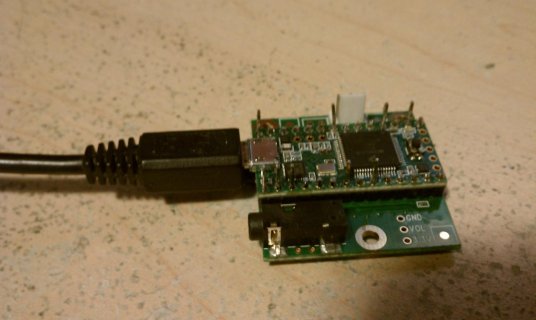
Play RAW from Serial Flash

Status
Not open for further replies.
Are you sure those are genuine W25Q128 chips? Did you get them from a reputable distributor, or a Ebay or Aliexpress merchant?

Mine came from Digikey.
 
@Roel: Not good... ):
I use this chips all the time, all are ok.
There might be an other problem with your setup, but that sounds to me like a not working chip..
But, it's interesting that it is identfied correctly, and you get the same result every time. So it is not completely dead(?)
 
I'll buy a new one at ebay, in a month I know if it works with the new chip.
When it arrives I will keep you updated.

Thanks by the way for the help and the quick responses.
 
I've merged this code to the audio library. Thanks for putting this together.

https://github.com/PaulStoffregen/Audio/commit/f13e51ee97b3f041f9a5608e754482787186af56

The web design tool has also been updated. :)

http://www.pjrc.com/teensy/gui/?info=AudioPlaySerialflashRaw

I did make one tiny change, from "AudioPlaySerialRaw" to "AudioPlaySerialflashRaw". Yeah, that's long... but someday there may be some sort of serial streaming, so my hope is a longer name will avoid confusion when/if that ever happens.

One piece that's still missing is a good example. Any chance someone would like to contribute one, with public domain or well documented creative commons sounds? Ideally, an example should show the serial flash's ability to play many concurrent streams.

Hi Paul,

I have finally got around to updating to the latest Teensyduino and integrating the library updates into my project. Everything is looking great, thanks!

I did notice one small issue with the documentation; in the changelog at https://www.pjrc.com/teensy/td_download.html you credit Pensive with the Serial Flash audio playback stuff, not me. The code headers correctly lists me. Obviously this is not a big deal at all, but it would nice for everything to line up.

On a different note, I have also made some changes to other core libraries to work with my project. Most notably, I have mixers of different sizes so that you don't need to stack multiple mixers together, and I have added the ability to change the CS pin for SPI flash. If you are interested in those changes for inclusion into your libraries, please let me know and I can do a pull request on your github.

Cheers
 
I've updated the changelog. Pensive did develop the bitcrusher effect, but the single line format for 3 additions made it look like he did all 3.
 
Most notably, I have mixers of different sizes so that you don't need to stack multiple mixers together, and I have added the ability to change the CS pin for SPI flash. If you are interested in those changes for inclusion into your libraries, please let me know and I can do a pull request on your github.

Sure, submit a pull request on github.

However, really wide mixers are discouraged. Due to the way the audio connections and updating of data works, wide mixers hog memory.
 
Sure, submit a pull request on github.

However, really wide mixers are discouraged. Due to the way the audio connections and updating of data works, wide mixers hog memory.

How wide is too wide? I am using a Mixer16 right now, and it seems to work fine, but I have not paid attention to memory usage, other than 'it works'. (I am not using all channels; 2 channels are for the i2s input as a passthrough, and 10 channels are used for actual sample playback, for a total of 12.)

I'll do a pull request tonight for the CS pin stuff on the serial flash. Not sure if it would help others or not, but it allows you to use multiple SPI flash chips on the same bus. (in my project I have a 16MB chip on the audio board, and a 64MB chip on my actual project board; I would never need to use both, but it lets me select one or the other without needing to unsolder the one from the audio board). Feel free to accept or reject as you see fit.
 
I'll do a pull request tonight for the CS pin stuff on the serial flash. Not sure if it would help others or not, but it allows you to use multiple SPI flash chips on the same bus. (in my project I have a 16MB chip on the audio board, and a 64MB chip on my actual project board; I would never need to use both, but it lets me select one or the other without needing to unsolder the one from the audio board). Feel free to accept or reject as you see fit.

So it looks like I had already issued a pull request back in June for this. See https://github.com/PaulStoffregen/SerialFlash/pull/8. I have updated it to include your recent changes (I think; the github interface is a bit confusing on this point, but even if I have not, the merge doesn't have any conflicts). Please let me know if this works for you.

Cheers
 
Still NOT able to flash the Winbond W25Q256FV chip using the included Teensy SerialFlash library.

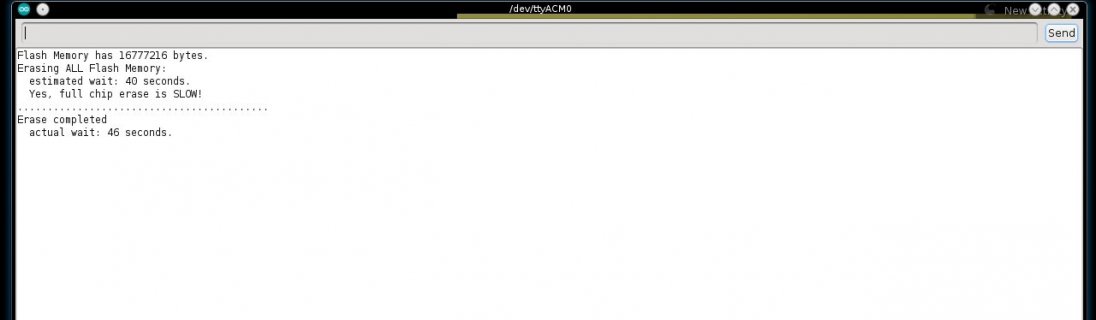
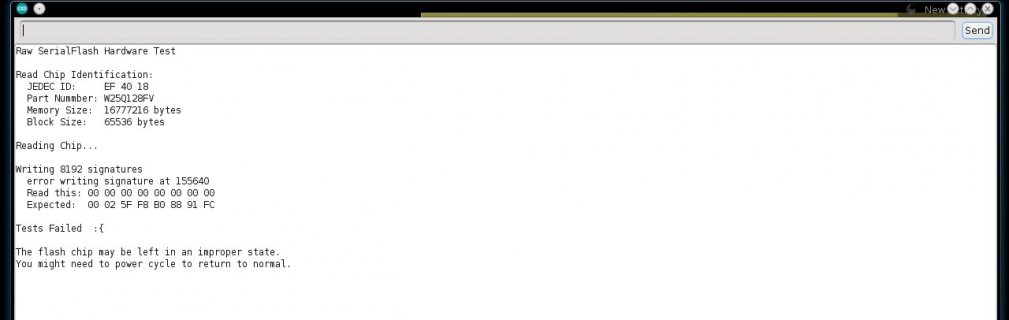
This is a chip I purchased from Digikey and one that has been working prior. Initially was using Frank's flashing library. But since the upgrade, I figured Id give it go a while back. Still the same results. I have done several full flash erases at different Teensy speeds. As well as hardware tests. All resulting in the same outcome. Failure. I really wish there was an answer on this. I have attached my screen shots.

Please note: This is the proper flash chip purchased from a reputable dealer, Digikey. And it works fine when using Frank's flashing tool.

Thank you!

flash erase.jpg

flash hardware test.jpg
 
Woops, I typed that wrong.

It is a W25Q128FV - as per the attached image above. Verified visually as well.

This chip IS in your list of tested chips.

Thanks!
 
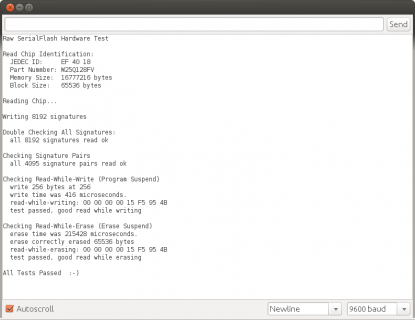
As you can see in the screenshots on message #284, the W25Q128FV chip I have here works.

I do not know why your chip isn't working. Without a way to duplicate the problem, I just don't know what more I can do.... unless you send me your hardware.
 
Woops, I typed that wrong. It is a W25Q128FV

I was starting a post yesterday saying I some have fresh DigiKey 128's when I read your "256" and deleted my post.

I was going to ask you to summarize with needed details (board pic) in one current post your setup software/hardware so I could "play along" and see what results I get. I have a PJRC Audio Board - as well as some of Frank_B's memory boards (and parts) at the ready.

Doing that might let Paul see any issues - or help me do it to a good end.
 
Interestingly (from my memory) my full erase was much faster than yours.
How long does it take for you with my flashing-tool ? 46Seconds too ?
 
Interestingly (from my memory) my full erase was much faster than yours.
Good One Frank . . . "(from my memory)" . . .

dsparks - per my post and Frank's - please post the code you are using if it isn't a 'canned' sample you can link with no edits.

Frank - if you know what hardware (PJRC AudioBrd?) is in use and could drop notes or a link to the right post to make it work as you did with that chip - I'll build one up.

:)
Yes it was the PJRC AudioBrd ("Bird?").
My "memory" may be wrong, but i don't think it was much more than 30 secs. Does it depend on the amount of used flashblocks ?
 
When you run the File > Examples > SerialFlash > RawHardwareTest, please make sure you uncomment these 2 lines:

Code:
  //uncomment these if using Teensy audio shield
  SPI.setSCK(14);  // Audio shield has SCK on pin 14
  SPI.setMOSI(7);  // Audio shield has MOSI on pin 7
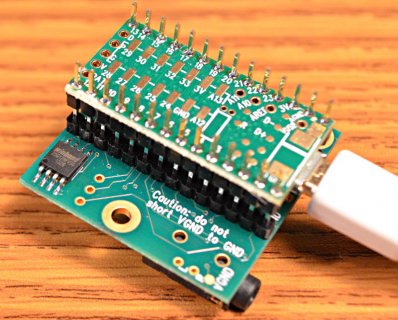
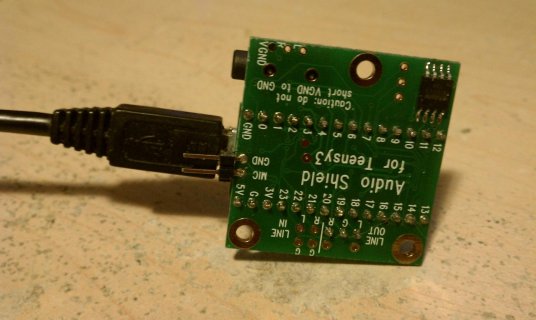
Also, run the test without a SD card.

I just ran it *again*, and again it worked. Here's another screenshot of the test I just ran:

sc.png

Here's a photo of the hardware I just tested.

sf.jpg

All I did was open File > Examples > SerialFlash > RawHardwareTest, uncomment those 2 lines, and upload to this board. Then I opened the serial monitor window, and you can see the result is correct.

I have no idea why you're getting a different result. Even though I tried yet again, I'm not able to reproduce your problem.
 
Perhaps your hardware is somehow different? Maybe you have another SPI device connected, which could be causing interference? Maybe a SD card was in the socket and started recognizing part of the test and tried to drive MISO while the flash chip was communicating?

Really, I'm just guessing here. I have no idea. Maybe if you post a few good photos of the hardware you're actually testing, maybe we'll see what's different?

You maybe you could try running your test on hardware exactly as I did? It does work here. Unless your chip is defective, it really should give the same result if you run the same code on the same hardware!
 
Guys,

I was able to get the hardware scan to work properly. After removing the SD card. I am using the standard example sketches within. Only altering the 2 lines of code for use with the audio board. However when trying to write files to the flash chip from SD card, I get failures still. I have modified the SDchipSelect variable to 10, as per the comment in the example code. And yes, I did put the SD card back in before trying to upload the files to the flash chip.

Getting closer. Thanks for the help!

teensy_audio1.jpg

teensy_audio2.jpg
 
I was able to get the hardware scan to work properly. After removing the SD card.

I've added comments to all the SerialFlash examples which should help avoid this issue in the future.

https://github.com/PaulStoffregen/SerialFlash/commit/2ab60772d89b4a5134527f2313c7e1b25662fd90

The new version 2 audio boards have 10K pullup resistors on pins 6 and 10, which are meant to keep the SD card disabled if you only use the flash chip, and the flash chip disabled if you only use the SD card. That doesn't help with your version 1 board.... but my long-term goal is to prevent these sorts of problems from happening in the first place!

However when trying to write files to the flash chip from SD card, I get failures still.

Well, I can try to help with this too. Perhaps by now you're familiar with the way things work here, where you need to provide all the details to reproduce the problem....
 
Status
Not open for further replies.
Back
Top