
Ysomething
Member
Hello,
I'am working on an electronic timing project. I already implemented a prototype with a Teensy 2.0 as the controller and XBees as the wireless modules.
Now I want to replace the Teensy 2.0 with a Teensy LC and the XBees with SparkFun RFM69 Breakout (434MHz) modules.
The difference between an XBee and the RFM69HCW module is that the RFM cannot act without a microcontroller. So I would set up the sensors with a Teensy LC and a RFM module in combination.
But this is the problem. I don't get 2 Teensy LC communicating via RFM modules to each other. Neither with the LowPowerLabs nor with the Radiohead library.
I didn't find a working example.
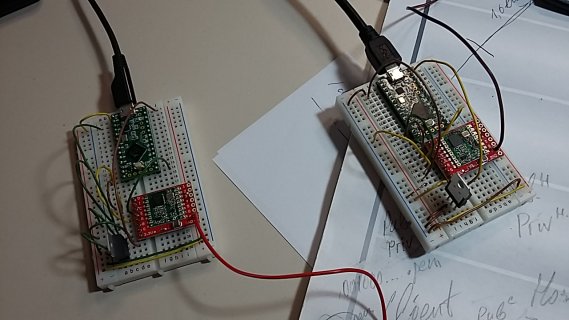
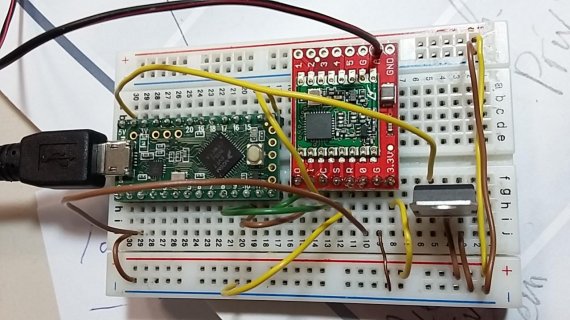
This is my hardware setup:
The Teensy LC is connected to a Host PC via a micro USB cable.
As the 3.3 V pin of the Teensy LC has a power limitation of 100mA, I use a LD33CV (LD1117V33) to make the RFM module (which needs about 130mA) working.
LD33VC TeensyLC pin RFM69HCW pin
====================================================
GND-Pin G G
- 12 O
- 11 I
- 10 S
- 13 C
- 0 0
GND-Pin G R
Output - 3.3V
Input 5V -
(Because of formating issues of this table I attached a picture of it as it should look like.)
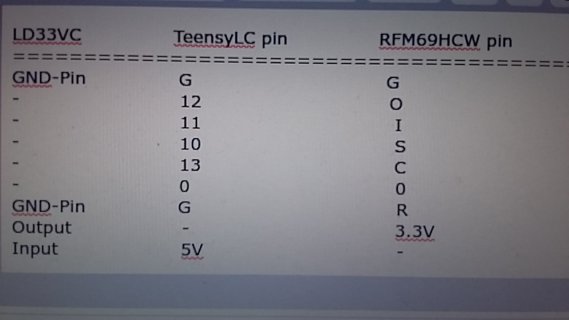
I also attached 2 pictures of my hardware setup. So you can see what I described above.
Software setup:
I'm not sure what software combination I should use. I didn't get any of the possibilities running, yet.
I tried the RadioHead library with it's examples. I tried the LowPowerLab libraries with it's example. Both without any success. I didn't try the PlainRFM69 yet. This is my next
step.
The RFM module work with interrupts. Maybe the interrupt/interrupt pin is not configured correctly. Does the interrupt on the LC has to be configured manually?
I read lots of information, HowTos and guides:
https://learn.sparkfun.com/tutorials/rfm69hcw-hookup-guide
https://forum.pjrc.com/threads/3528...nctioning-with-Teensy-3-2-and-RFM69-Libraries
https://forum.pjrc.com/threads/3517...ctional-Logic-Level-Converter-with-Teensy-3-2
https://forum.pjrc.com/threads/35626-Help-With-RFM69HCW-Radio
https://learn.adafruit.com/adafruit...-rfm98-lora-packet-padio-breakouts/rfm69-test
http://www.airspayce.com/mikem/arduino/RadioHead/
https://github.com/LowPowerLab/RFM69
https://github.com/sparkfun/RFM69HCW_Breakout/archive/master.zip
I would like to know if my hardware setup is able to work as I expect and which software/configuration do I need for that.
Thank you very much for your help!
Best regards!
I'am working on an electronic timing project. I already implemented a prototype with a Teensy 2.0 as the controller and XBees as the wireless modules.
Now I want to replace the Teensy 2.0 with a Teensy LC and the XBees with SparkFun RFM69 Breakout (434MHz) modules.
The difference between an XBee and the RFM69HCW module is that the RFM cannot act without a microcontroller. So I would set up the sensors with a Teensy LC and a RFM module in combination.
But this is the problem. I don't get 2 Teensy LC communicating via RFM modules to each other. Neither with the LowPowerLabs nor with the Radiohead library.
I didn't find a working example.
This is my hardware setup:
The Teensy LC is connected to a Host PC via a micro USB cable.
As the 3.3 V pin of the Teensy LC has a power limitation of 100mA, I use a LD33CV (LD1117V33) to make the RFM module (which needs about 130mA) working.
LD33VC TeensyLC pin RFM69HCW pin
====================================================
GND-Pin G G
- 12 O
- 11 I
- 10 S
- 13 C
- 0 0
GND-Pin G R
Output - 3.3V
Input 5V -
(Because of formating issues of this table I attached a picture of it as it should look like.)
I also attached 2 pictures of my hardware setup. So you can see what I described above.
Software setup:
I'm not sure what software combination I should use. I didn't get any of the possibilities running, yet.
I tried the RadioHead library with it's examples. I tried the LowPowerLab libraries with it's example. Both without any success. I didn't try the PlainRFM69 yet. This is my next
step.
The RFM module work with interrupts. Maybe the interrupt/interrupt pin is not configured correctly. Does the interrupt on the LC has to be configured manually?
I read lots of information, HowTos and guides:
https://learn.sparkfun.com/tutorials/rfm69hcw-hookup-guide
https://forum.pjrc.com/threads/3528...nctioning-with-Teensy-3-2-and-RFM69-Libraries
https://forum.pjrc.com/threads/3517...ctional-Logic-Level-Converter-with-Teensy-3-2
https://forum.pjrc.com/threads/35626-Help-With-RFM69HCW-Radio
https://learn.adafruit.com/adafruit...-rfm98-lora-packet-padio-breakouts/rfm69-test
http://www.airspayce.com/mikem/arduino/RadioHead/
https://github.com/LowPowerLab/RFM69
https://github.com/sparkfun/RFM69HCW_Breakout/archive/master.zip
I would like to know if my hardware setup is able to work as I expect and which software/configuration do I need for that.
Thank you very much for your help!
Best regards!
Last edited: