Anyone tried MTP library under Vscode-Platformio environment?

pjy5451

Member
Hi

I'm currently developing for integrating MTP_teensy example on my main source.
For neglecting cumbersome library collision, I just created a new project (Teensy 4.1) and tried to run MTP example (Simplied Examples>Example3-simple sd)

Since there is no MTP_teensy library on the project library, I copied and pasted the library what I got from github (MTP_Teensy-main)
https://github.com/KurtE/MTP_Teensy

But there are several errors occurred badly..

1. FS.h: No such file or directory
I could download any FS.h library from anywhere, but before that, I would like to make sure where I need to acquire FS.h library to avoid library collision.
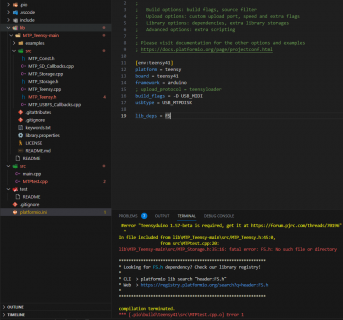
envi.PNG

2. USB Type selection
when I tried example_3_simple_sd example code using arduino sketch, I had to change usb type as "MTP Disk (experimental)"
But I don't know what I need to change its mode in platformio environment
Through googling, I got to know that there is an option as usbtype = USB_MTPDISK so i adopted it, but please let me know it's correct or not
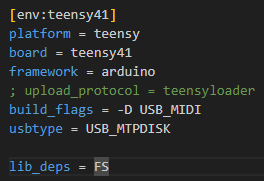
ini image.PNG

3. SD.h vs SDfat.h
Actually, main goal of my project is composed of two things
(1) Saving data in high rate through SDfat.h library
(2) Getting an access to SD card through external USB port

However, if I suppose that I solve the above two issues, I can't avoid worry about coming library collision issue
When I included <SD.h> and <SDfat.h> libraries simultaneously before, It gives an error
I need to sdfat library for my fast data saving, but SD.h is also mandatory required for using mtp_teensy library as i think

Sorry for many asking and thank you so much for helping me in advance
 
1. FS.h is found in cores/teensy4/FS.h

2. Correct

3. Have you even looked inside SD.h yet?

Code:
#include <Arduino.h>
#include <SdFat.h>

Teensy's implementation of SD is a very thin layer directly calling SDFat. You should look at the SdFat_Usage example to see how you can make direct SDFat calls using teensys SD but you might not need to.
 
Thank you for replying

1. FS.h is also found in cores/teensy4 but it isn't compiled and gives error. Should i add fs.h by myself when I use platformio?
fs.PNG

2. Thanks for confirming

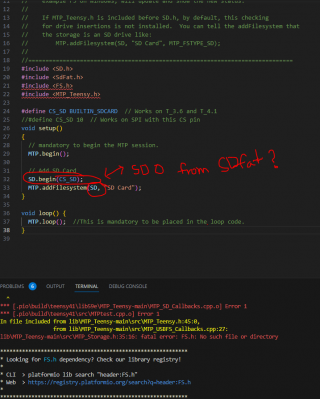
3. Let me see through.. I understood that SD.h is required for using MTP example code since as below.. Can i perform the same function by using SDO.begin()?
sdo.PNG
 
Sorry, I am not a PlatformIO user so not much help, but:

1) Sounds like a dependency issue. Like somewhere, there should be on the command line that compiles the files, needed to add the -I for where the Teensy core is located.
For example using Arduino 2.1 the compile lines include:
"-IC:\\Users\\kurte\\AppData\\Local\\Arduino15\\packages\\teensy\\hardware\\avr\\0.59.2\\cores\\teensy4"

3) MTP code works using File systems as defined in FS.h so those native to sdfat can not be added to the list of file systems that are exposed by MTP. At least not directly. That is you could write your own simple FS wrapper object that forwards things to SDFat. But that is just recreating SD library.
 
Pjy5451:
Please include the entire terminal output when you try to build your code so we can see the complete system settings that your version of PIO is using. Also include your platformio.ini file as well which is very important.
If you would like I have working code using both littleFS on EXTRAM as well as the SD card system with MTP code, which works very well. I could ZIP it up and include it here if you would like to see what I did using PIO.

Regards,
Ed
 
I'd love to see that as well. I'm transitioning my project to Teensy 4.1, and am planning to bury the SD card in an enclosure... so being able to "see" the SD card via USB would be great.

I'm using PlatformIO and could try a test project if you could share what you have.

Thanks!
 
I'm using MIDI and SysEx messages to transfer files and it's going well. Only so many avenues to investigate!
 
I'm using MIDI and SysEx messages to transfer files and it's going well. Only so many avenues to investigate!
I'm not sure if it is the right way for me... I'm using the T41 to build a small OS LUA based in VSCode with PlatformIO. For that of course I need to access SD_CARD to copy from PC to Teensy SD using the build_flags as given. And also I'm struggeling right now with WMXZ's Branch MTP_t4... I get always Errors in the MTP.h with these lines:

C++:
#if defined __IMXRT1062__
  #if !defined(USB_MTPDISK) && !defined(USB_MTPDISK_SERIAL)
    #error "You need to select USB Type: 'MTP Disk (Experimental)'"
     ^~~~~ HERE as red line 
#endif

and

C++:
#elif defined(__IMXRT1062__)
  #define MTP_RX_SIZE MTP_RX_SIZE_480
                      ^~~~~~~~~~~~~~~ HERE (red line/flag)
  #define MTP_TX_SIZE MTP_TX_SIZE_480
                      ^~~~~~~~~~~~~~~ HERE (red line/flag) 

  uint8_t rx_data_buffer[MTP_RX_SIZE] __attribute__ ((aligned(32)));
  uint8_t tx_data_buffer[MTP_TX_SIZE] __attribute__ ((aligned(32)));

The same affects with KurtE's repo and I didn't have tried Pauls Branch yet... I'm getting desperated right now.
And no matter what I try to get it with platformio.ini lib_deps, VSCode tells me immediately that no repo's availale for 64bit Systems,
so that I have to put it by hand in the lib Folder.

The main.cpp in
C++:
#include <MTP.h>
affects to

C++:
void loop(); {
MTP.loop();
^~~ (red flag)

Any thoughts to all this stuff?
 
I did... and I did it as mentioned often in other Topics to MTP with:

"-D USB_MTPDISK"
"-D USB + MTPDISK"
"MTPDISK (EXPERIMENTAL)"
"SERIAL + MTP"
"SERIAL + MTPDISK (EXPERIMENTAL)"
and so on...

Might be I do something wrong, just can happen. But I cannot exact recognize or assume where the mistakes comes from.
May you able to have a look deeper into it? It's your Branch/Repo which I've chosen for the T41

"'MTP' was not declared in this scope; did you mean 'MTPD'?"
Where to declare? If I create an Object called MTP_t4 MTP; before setup, it also made the MTP; red lined.
#include <MTP.h> is without errors.

This is how my ini looks:
C++:
; PlatformIO Project Configuration File
; Phoenix Operation System (POS) v1.0

[env:teensy41]
platform = teensy

board = teensy41

framework = arduino
lib_ldf_mode = deep

lib_deps =
    mischief/lua @ 0.1.1
    mathertel/RotaryEncoder
    
build_flags =
    -D USB_MTPDISK
    -D TEENSY_OPT_FASTER

monitor_speed = 115200

Thanks in advance
 
@ACME: @PaulStoffregen usually recommends that you build your sketch in the Arduino IDE with VERBOSE turned on. The verbose info will include the exact compiler string used to build, which you can then duplicate into your VSCode / PlatformIO build environment.

Hope that helps . . .

Mark J Culross
KD5RXT

P.S. Sorry, I don't have any experience with either VSCode or PlatformIO, as I have been able to successfully make use of the Arduino IDE + TD for all of my projects, including my most complex project, the TeensyMIDIPolySynth (TMOS) with T4.0: 20575 SLOC + T4.1: 56834 SLOC. So, unfortunately, I probably would not be able to answer any follow-on questions on either of those particular tools MJC
 
Back
Top